

Uptime — Full Breakdown
Uptime is a micro-learning app delivering five-minute book and course summaries. Its streak requires only one insight per day, the most forgiving streak definition in the library. Achievement cards are designed primarily as social media assets: pre-formatted, branded, shareable images generated automatically from consumption behavior. The app deploys three sequential paywalls across onboarding, each offering a better price than the last, reserving the lowest price for the moment after the first content completion.
Two mechanics carry the loop
The core loop
The core loop is: open app → select a hack → read through cards → save Sparks → complete hack → see congratulations screen (streak, hours saved, reminder setup, next hack, autoplay) → review Sparks via spaced repetition → browse discovery. The post-hack congratulations screen is the system's highest-density engagement moment.
What was observed
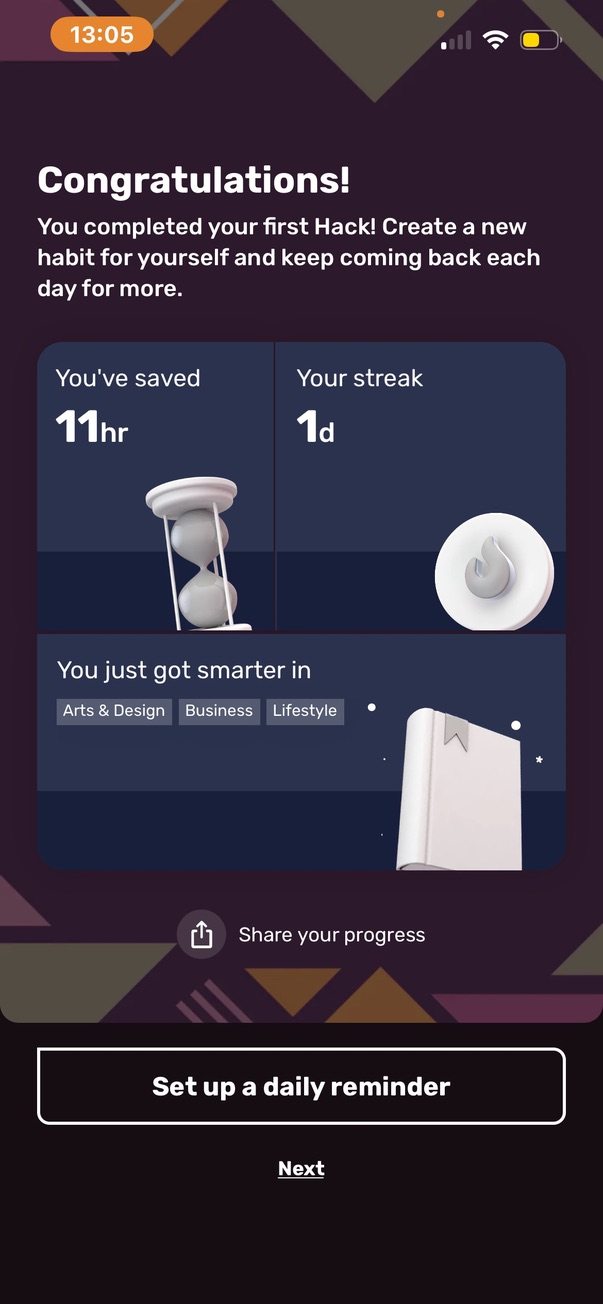
The streak counter appears in the top-right corner of the home screen immediately after the first hack is completed. The You tab opens directly to My Stats where the streak is the first element: "One day complete, complete one insight a day from any hack to get your daily streak." The daily minimum is explicitly stated on-screen: one insight from any hack, not a complete hack. After the first hack, a congratulations screen appeared: "you've saved 11 hours, your streak: one day, you just got smarter in [topics]," followed immediately by a "set up a daily reminder" button. Sharing is built in: tapping share generates a visual card ("one day, your streak, keep going with your learning habit") ready to post to social platforms.
How it is presented
The streak counter is visible in the top-right corner of the home screen alongside the premium trial countdown. The daily minimum action is defined on-screen in plain language. The post-hack congratulations screen surfaces the reminder setup button at peak engagement rather than during onboarding.
What is worth noting
The one-insight minimum is the most forgiving streak definition in the library, less demanding than Insight Timer's single session or Strava's weekly activity. A user who has five minutes and opens one card maintains their streak. The reminder setup button appearing after the first hack completion rather than during onboarding follows the same pattern Insight Timer uses, capturing the return habit at the moment the user has just experienced the product's value, not before they have any reason to care.
Key findings
- The one-insight daily minimum is the lowest streak bar in the library, a single card swipe satisfies the streak requirement, making this accessible even on the user's busiest days.
- The reminder setup prompt appears after completing the first hack, at peak motivation, rather than during onboarding, following the same pattern as Insight Timer.
- The streak is shareable as a pre-formatted visual card, making every milestone a potential social post and acquisition moment.
- The streak counter appears on the home screen alongside the premium trial countdown, connecting the streak display to the conversion pressure of an expiring trial.
What was observed
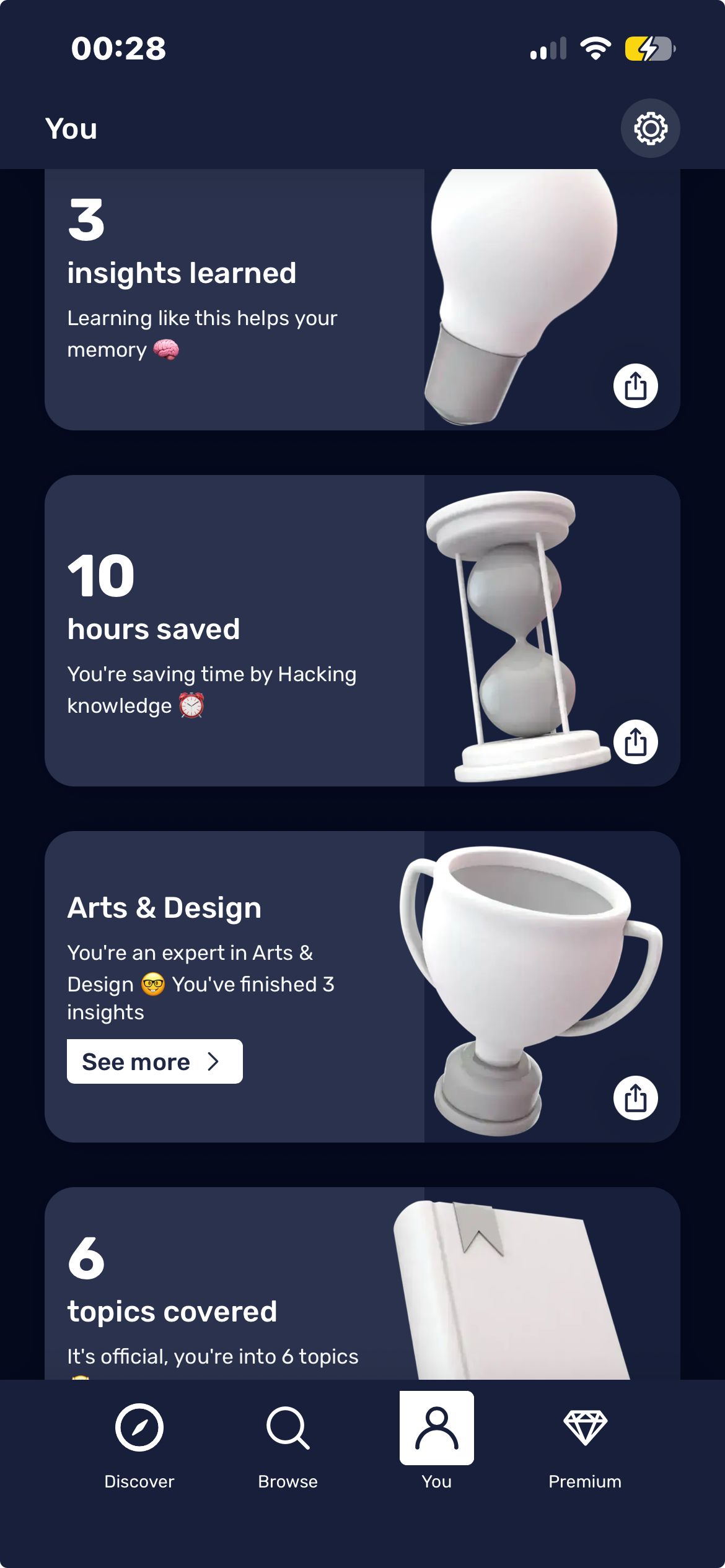
My Stats on the You tab contains a horizontally scrollable row of pre-formatted shareable achievement cards. Achievements earned in one session: 1 Day (streak milestone), 3 Insights Learned, 10 Hours Saved, Arts and Design (topic expertise badge), 6 Topics Covered. Each card has a distinct design and motivational label. Two types are interleaved: engagement milestones (days, insights, hours saved) and content expertise markers generated automatically from consumption behavior (completing hacks in a topic produces an "expert in X" badge). Tapping an expertise badge opens content in that topic rather than showing an achievement detail screen.
How it is presented
Achievements display as a card row in My Stats, no badge icons, locked future milestones, or progress bars. Cards appear only once earned. Each card has an individual share button generating a branded shareable image.
What is worth noting
The achievement system's primary output is social media content. Each card is pre-formatted and branded as a shareable image, "10 hours saved, you're saving time by hacking knowledge", designed to be posted rather than to be displayed in the app. The expertise markers ("you're an expert in arts and design") are automatically generated from consumption behavior without any explicit achievement hunting, making them feel like discovered facts about the user rather than manufactured rewards.
Key findings
- Achievement cards are designed as social media assets first, pre-formatted, branded, shareable images with motivational copy, and progress markers second.
- Expertise badges ("you're an expert in X") are generated automatically from content consumption behavior, without explicit achievement hunting, they feel like the app noticing something true about the user.
- Tapping an expertise badge opens filtered content in that topic, achievements function as content discovery entry points rather than trophy displays.
- No locked future milestones are visible, the achievement system shows only earned cards, creating a pure record of past behavior rather than a visible progression ladder ahead.
Where the mechanics meet
Streak / Streak Bonus Achievements / Milestones
Returning daily to complete hacks in a topic generates 'expert in X' expertise badges automatically, without any explicit achievement hunting. Users who maintain the streak for topic-specific reasons discover they have been accumulating expertise badges, achievements arrive as noticed facts rather than pursued goals.
Achievements / Milestones Gifting
Pre-formatted achievement cards, 'you're saving time by hacking knowledge', are the primary social sharing content. Sharing an achievement card is functionally a referral. Every achievement milestone is a potential user acquisition moment. The achievement and referral mechanisms share the same shareable image assets.
Streak / Streak Bonus Gifting
The post-first-hack screen surfaces the streak counter, reminder setup, and referral gift at the same moment, the peak engagement point of the first session. The highest-intent moment captures three retention and acquisition actions simultaneously: streak habit formation, reminder installation, and referral sharing.
What the system teaches
The single most instructive observation
The post-hack congratulations screen captures four distinct engagement actions at the single highest-motivation moment: social sharing, reminder setup, next hack suggestion, and autoplay toggle. All four at once, when the user has just experienced the product's core value for the first time.
What makes the system work
Achievement cards work because they are social media content first. Every milestone produces a branded shareable image with motivational copy. Users share their progress not to promote Uptime but because the cards look good and say something flattering about them. The achievement system's primary output is user acquisition through organic social sharing.