Named, permanent markers of progress or behaviour that the user collects over time.
Best for
AchieverExplorer
Context
ActivationRetentionReferral
Motivation drivers
MasteryCompetenceRelatedness
How it works
Permanent recognition of behaviour creates identity anchors
Achievement systems exist primarily for Achievers. Each completed milestone is a named, permanent record of accomplishment. Tiered achievements extend the goal horizon indefinitely. The mechanic works best when the marker carries value beyond the product that issued it, a badge that can be shared or displayed externally has a second life the app cannot provide.
Core principle
Permanent recognition of behaviour creates identity anchors. The badge is not a reward, it is evidence.
Watch out for
Achievement systems buried deep in settings see almost no organic discovery. Surface achievements at the moment of completion, not in a tab the user never opens.
Structural variants
Four ways to build it
01
Tiered badges
02
Hidden achievements
03
Social badges
04
Certification achievements
Lifecycle placement
Long-term value. Achievers return specifically to close achievement gaps.
Case studies · 8
Seen in the wild
CanvaDesign
How they use it
Design School houses the achievement system. Named badge tiers: First Course / Three Courses / Five Courses, First Certificate / Three Certificates / Five Certificates, Sharing Superstar, and LinkedIn Official. Badges display as a grid, grayed out until earned, each with a 'Browse Courses' CTA. Completing a quiz triggers a two-step reveal: a confetti screen announcing the badge, followed by the certificate with credential ID, date, and shareable options.
Why it works
The certificate is designed to leave the app. A credential ID and shareable card make the completion artifact credible enough for LinkedIn or a portfolio. The LinkedIn Official badge names its distribution channel directly, a platform-specific instruction that signals exactly where the achievement should go without requiring the user to figure it out.
The detail
Achievements are inside Design School, accessed via the sidebar. The section has four sub-tabs: Overview (aggregate stats), Badges, Certificates, and Skills. Completing the AI Skills for Students quiz during analysis triggered both the First Certificate badge and a downloadable certificate with a credential ID.
Takeaway
The LinkedIn Official badge names LinkedIn specifically as its sharing target, the most platform-specific social sharing incentive observed across the library.
screenshot
Achievements section in Design School showing the badges grid — First Course, First Certificate, Sharing Superstar, LinkedIn Official — with grayed-out unearned badges and the Browse Courses CTA
screenshot
Certificate of Completion popup showing confetti, "You've hit a learning milestone" message, and the "You're Canva Certified" follow-up with social share and download options
Achievement milestones are tied to chapter completion and survival day records. Clearing Chapter 1 (survive 60 days) unlocks Chapter 2 content and is treated as a named milestone. Personal best run length is shown on every defeat screen, framing every run as a score-attack against the player's own record. The roguelite structure inherently milestones every improved personal best.
Why it works
The defeat screen personal best display converts every run-end moment into a progress marker, even a failed run sets a new context for the next attempt. This reframes failure as data about the next run rather than a pure loss.
The detail
Chapter completion triggers a dedicated celebration sequence. The defeat screen shows personal best run length prominently. Chapter completion gates feature unlocks, each chapter milestone reveals new content systems.
Takeaway
Personal best run length is displayed on every defeat screen, reframing failure as a score-attack milestone rather than a pure loss.
Fortune City has 100 named achievements organized into themed groups, accessible via the hamburger menu under Your City. The groups cover behavioral milestones (consecutive tracking days), city progression (prosperity levels, population counts), expense category tracking (Foodie Paradise, Beverage Bay, Shopping Mecca, each scaling from 10 to 100 recorded expenses), ad engagement (Watch Ads to Help the Salesman, 5 to 1,000 watches), social behaviors (City Photographer, sharing photos 5 to 50 times), and cross-app installs (Best Apps, downloading Plant Nanny, To Do Adventure, and other Sparkful titles). Achievement popups appear automatically after triggering actions and can fire in quick succession after a single expense entry.
Why it works
The achievement system does three jobs simultaneously: it rewards core behavior (expense logging), it rewards platform-beneficial behavior (ad watching, app downloads, social sharing), and it distributes the premium currency (diamonds) that funds citizen recruitment and city themes. The 100-achievement count makes this the most expansive achievement system in the library, large enough that no two users will complete the same subset in the same order.
The detail
Achievement popups appear as overlay cards with the achievement name, badge, diamond reward, and a share button. The full list is browsable in the Achievements tab, organized by group, with earned badges visually distinct from locked ones. The diamond reward is visible on each card. Two achievements completed in the first session.
Takeaway
The Watch Ads to Help the Salesman achievement track (5 to 1,000 watches, ending in Charitable Superstar) is the only achievement system in the library that makes ad watching a named, tiered progression goal.
screenshot
Achievements tab showing Great Habits group (1-day, 3-day, 7-day, 30-day, 90-day consecutive tracking badges) with earned badges lit and unearned grayed, diamond reward amounts visible
screenshot
Achievement popup showing "Making a Difference — Build your first building — reward 3 diamonds" card with share button
Milestone thresholds: 7 consecutive days (first milestone), 50 non-consecutive days, 1 milestone, 5 milestones, 25 milestones, 100 milestones. Each milestone unlock triggers a 'you've unlocked a gift' screen framing the reward as something the user earned. The trial extension at the first milestone extends from 7 to 30 days. Stats accumulate permanently: total sessions, total minutes, milestones count, longest streak.
Why it works
The trial extension at the first milestone is the most structurally sophisticated achievement design in the library, it rewards reaching a milestone with more time inside the product, making the achievement's value inseparable from continued engagement. The 'gift' framing uses reciprocity rather than reward language.
The detail
Milestones appear in the streak detail screen. Each achievement triggers a 'gift you've unlocked' screen. The full stats history is visible in the profile sidebar.
Takeaway
The first milestone (7 consecutive days) triggers a trial extension from 7 to 30 days, the achievement reward is more product access, making continued engagement the most natural next action.
screenshot
Streak screen showing the milestones ladder — 7 consecutive days / 50 non-consecutive days / 1 milestone / 5 milestones / 25 milestones / 100 milestones — with the current 0 milestones state
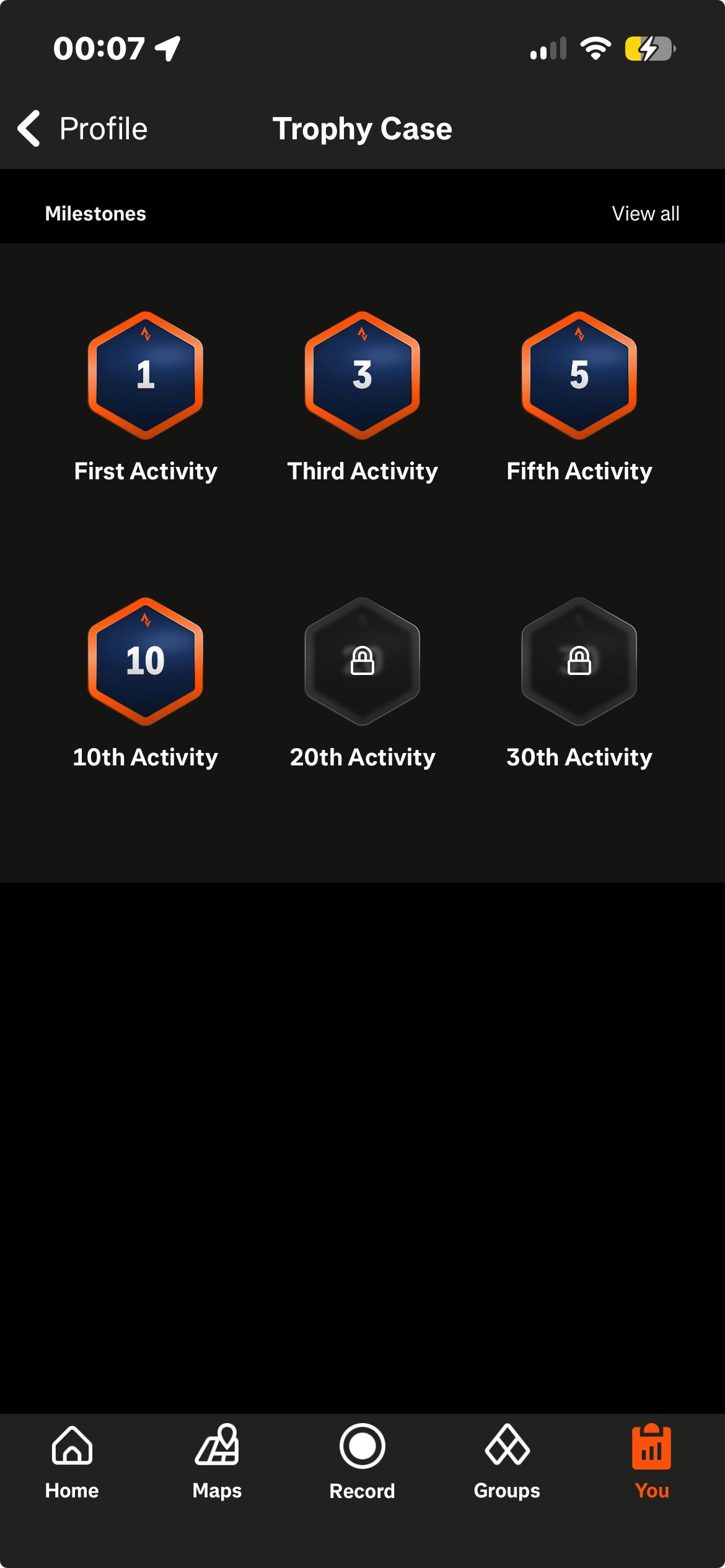
Strava's trophy case tracks two types: personal records (fastest, longest, highest) and activity count milestones (1st, 3rd, 5th, 10th activity in a sport, up to 1,000th). Local Legend and Course Record badges display on the profile when held. Each trophy is automatic, no opt-in required. The profile trophy case is public and visible to any Strava user who views the profile.
Why it works
The automatic PR system means every activity has the potential to generate a new achievement without the user deciding to pursue one. A casual run could set a longest-run-ever personal record without any prior intent. This makes achievements ambient rather than goal-directed, they surprise rather than reward deliberate performance.
The detail
Trophies appear on the profile trophy case and on individual activity posts in the feed. A 'Nice work' animation fires at each badge unlock. The You tab shows current streak, milestones, and the 12-week activity calendar in a single view.
Takeaway
First Activity trophy triggered during a 44-second test ride during analysis, the bar for the first milestone is intentionally low to create an early reward moment regardless of effort level.
The marble collection system on the Stats tab is the primary achievement display. Marbles are collected in a horizontal scrollable row, each representing a named milestone on two tracks: task completion (Ignition at day 1, Spark at first task, then 7, 14, 30, 60, 110, 160, 250, 360 tasks, to 30,000) and streak days (1, 3, 7, 10, 14, 21, 30, to 1,600). Each marble has a distinct visual design. The distinctive behavior: unlocking a marble changes the background gradient of the Stats tab to reflect the new marble's color, the entire ambient visual environment of the screen shifts with each achievement.
Why it works
The background gradient color change is the most visually integrated achievement reward in the library. In every other app, achievements add a new badge or item to a static display. Tiimo's marbles change the ambient visual environment of the screen, the achievement does not just mark progress, it alters the space the user inhabits. This is consistent with Tiimo's design philosophy for neurodivergent users, where visual clarity and satisfying feedback are primary values.
The detail
The marble row is the first element on the Stats tab, above the streak bar and task counter. Marble unlocks trigger celebration animations. Locked future marbles are visible with countdown labels ("unlocks in 3 days"). The first two marbles (Ignition and Spark) were earned within a single onboarding session.
Takeaway
Unlocking a marble dynamically changes the background gradient of the Stats screen to reflect the marble's color, the only achievement reward in the library that alters the ambient visual environment rather than adding an item.
screenshot
Stats tab marble row showing earned Ignition and Spark marbles alongside locked upcoming marbles with "unlocks in 3 days" labels, with the gradient background reflecting the current marble's color
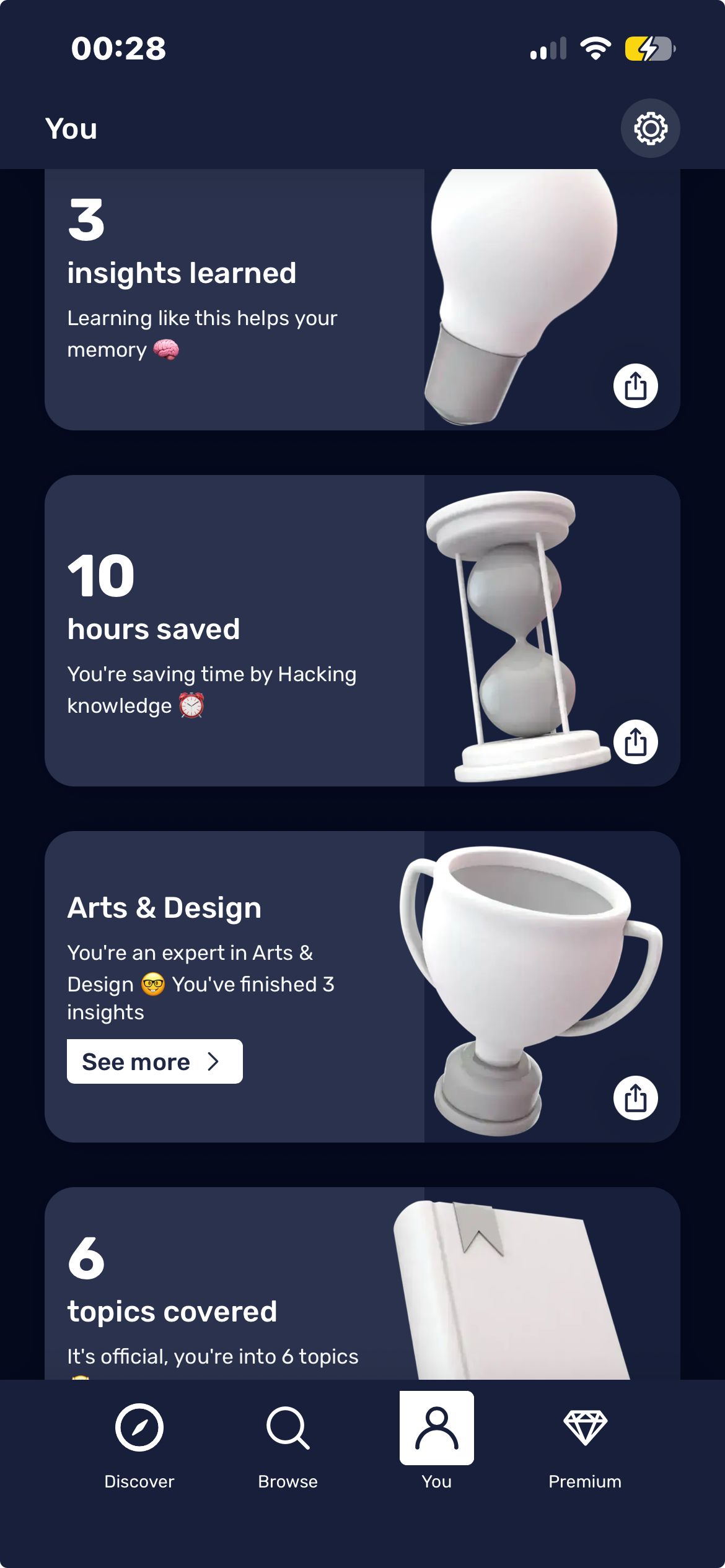
My Stats on the You tab contains a horizontally scrollable row of pre-formatted shareable achievement cards. Achievements earned in one session: 1 Day (streak milestone), 3 Insights Learned, 10 Hours Saved, Arts and Design (topic expertise badge), 6 Topics Covered. Each card has a distinct design and motivational label. Two types are interleaved: engagement milestones (days, insights, hours saved) and content expertise markers generated automatically from consumption behavior (completing hacks in a topic produces an "expert in X" badge). Tapping an expertise badge opens content in that topic rather than showing an achievement detail screen.
Why it works
The achievement system's primary output is social media content. Each card is pre-formatted and branded as a shareable image, "10 hours saved, you're saving time by hacking knowledge", designed to be posted rather than to be displayed in the app. The expertise markers ("you're an expert in arts and design") are automatically generated from consumption behavior without any explicit achievement hunting, making them feel like discovered facts about the user rather than manufactured rewards.
The detail
Achievements display as a card row in My Stats, no badge icons, locked future milestones, or progress bars. Cards appear only once earned. Each card has an individual share button generating a branded shareable image.
Takeaway
Achievement cards are designed as social media assets first, pre-formatted, branded, shareable images with motivational copy, and progress markers second.
Two achievement-adjacent surfaces were observed. The word count milestone: after crossing 500 words dictated, the speaking speed stat (words per minute) unlocks on the home screen, accompanied by a percentile ranking, 'top 2% of all Flow users', at 674 words dictated during analysis. The session also displayed '674 words, you've written 13 postcards,' translating the raw word count into a real-world equivalence anchor.
Why it works
The user didn't enter a competition, they just used the product. After crossing 500 words, a percentile ranking appeared that positioned their speaking speed favorably among all users. This is a social comparison metric delivered passively through usage, rewarding engagement with a flattering comparative signal without requiring any deliberate performance.
The detail
The milestone is previewed in advance as a progress prompt: '276 more words to unlock your speaking speed.' After crossing the threshold, the stat appears on the home screen card alongside the day streak. The percentile ranking appears as a named comparative result, not a badge.
Takeaway
The 'top 2% of all Flow users' percentile emerges from hitting a word-count threshold during normal use, not from any competitive entry, a social comparison delivered passively.
screenshot
Home screen word count card showing "674 words dictated — you've written 13 postcards" alongside the 129 wpm card with "top 2% of all Flow users" label
Each week we add three fresh breakdowns of how successful apps implement game mechanics. Get the most interesting mechanics from each, straight into your inbox.